Master the Art of iPhone Digiscoping for Stunning Nature Shots
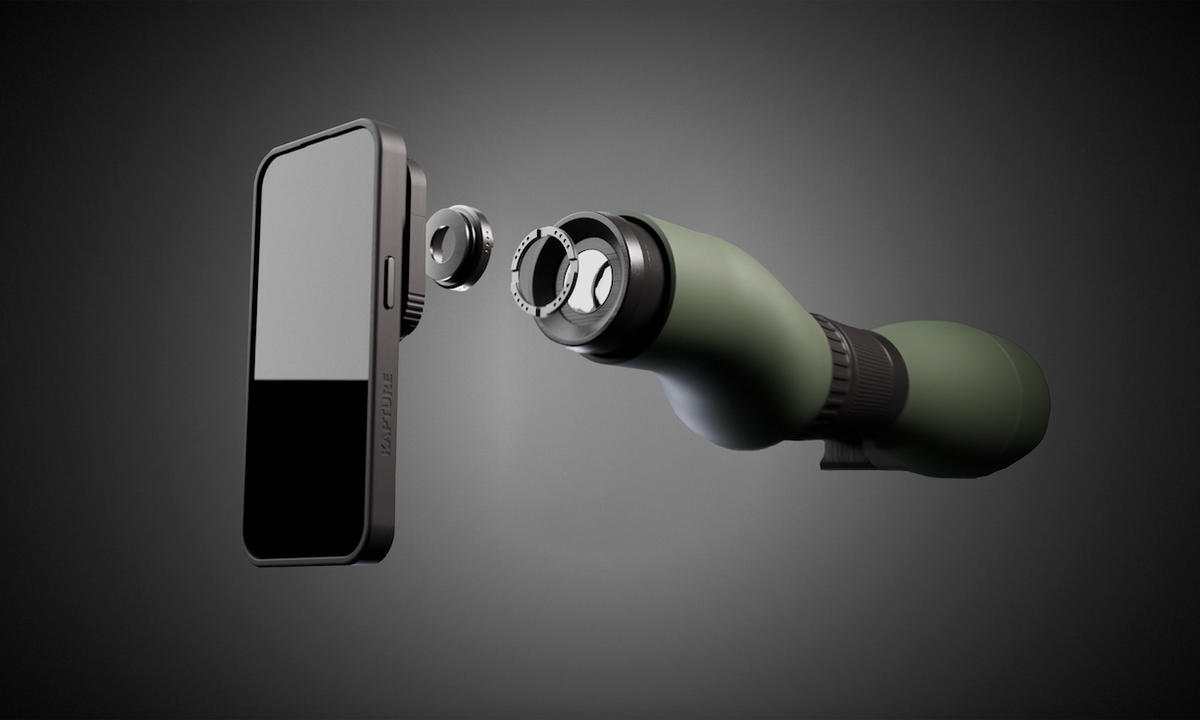
In the age of smartphone photography, capturing stunning nature shots has become an accessible hobby for many. The art of digiscoping, which combines a smartphone with a telescope or binoculars, has opened new avenues for nature enthusiasts to capture breathtaking images of wildlife and landscapes. The iPhone, with its superior camera technology, is a popular choice for this purpose. Mastering the art of iPhone digiscoping can transform your nature photography, allowing you to bring distant subjects into sharp focus with remarkable clarity. This guide delves into the essentials needed to elevate your iPhone digiscoping skills to new heights.
Understanding the Basics of Digiscoping
Digiscoping refers to the practice of using a digital camera, or in this case, a smartphone, to capture images through a telescope or binoculars. This technique is ideal for photographing birds, wildlife, and distant landscapes, offering a unique perspective that standard smartphone photography cannot achieve.
Essential Equipment
- Smartphone Adapter: A key component that securely attaches your iPhone to the eyepiece of a spotting scope or binoculars. It ensures stability and alignment.
- Spotting Scope or Binoculars: Choose a high-quality optical device with sufficient magnification to capture distant subjects clearly.
- Tripod: A sturdy tripod minimizes vibrations and ensures stable shots, essential for crisp images.
- Lighting Accessories: Consider portable lights or reflectors to improve lighting conditions when needed.
Discover expert strategies here to choose the right equipment for your needs.
Step-by-Step Guide to iPhone Digiscoping
Setting Up Your Equipment
Start by securely attaching your iPhone to the adapter and then to the optical device. Ensure that the camera lens is perfectly aligned with the eyepiece to prevent vignetting, where the image appears dark around the edges.
Optimizing Camera Settings
- Focus: Use manual focus if available to achieve the sharpest possible image of your subject.
- Exposure: Adjust the exposure settings to compensate for lighting conditions, enhancing image quality.
- Stabilization: Enable any stabilization features on your iPhone to reduce blurriness caused by movement.
Explore advanced guides and tips here to fine-tune your camera settings for optimal results.
Enhancing Your Nature Shots
Composition and Framing
Pay attention to the composition of your shots. Use the rule of thirds to place subjects off-center for a more dynamic image. Consider the background and foreground to add depth and interest to your photographs.
Post-Processing Techniques
- Editing Apps: Use photo editing apps like Lightroom or Snapseed to enhance colors, contrast, and sharpness.
- Filters: Apply filters sparingly to maintain the natural beauty of your shots while enhancing mood and tone.
- Cropping: Crop your images to remove distractions and focus on the main subject.
Find out more about this approach here and elevate your post-processing skills.
Common Challenges and Solutions
Dealing with Low Light
Low light conditions can be challenging in digiscoping. Use a higher ISO setting to allow more light into the camera sensor. Employ external lighting where possible, such as a flashlight or portable LED light.
Managing Movement
Wildlife can be unpredictable. Anticipate movement and use burst mode to capture multiple frames, increasing the chance of achieving a perfect shot.
Learn about our tailored solutions here to handle common digiscoping challenges effectively.
Mastering iPhone digiscoping requires patience, practice, and a keen eye for detail. With the right equipment and techniques, capturing stunning nature shots becomes an achievable goal. Whether you are a seasoned photographer or a beginner, these insights and tips will help you capture the beauty of the natural world like never before.
